
Which app should I use for IPTV on iPhone and iPad?
Use UHF. It is in the App Store, works the same on iPhone, iPad and Apple TV, and takes a few minutes to set up.
Use UHF. The app is in the App Store, is built for Apple's devices and works the same way on iPhone, iPad and Apple TV. You add your account with Xtream Codes and are up and running in a few minutes.
What you need
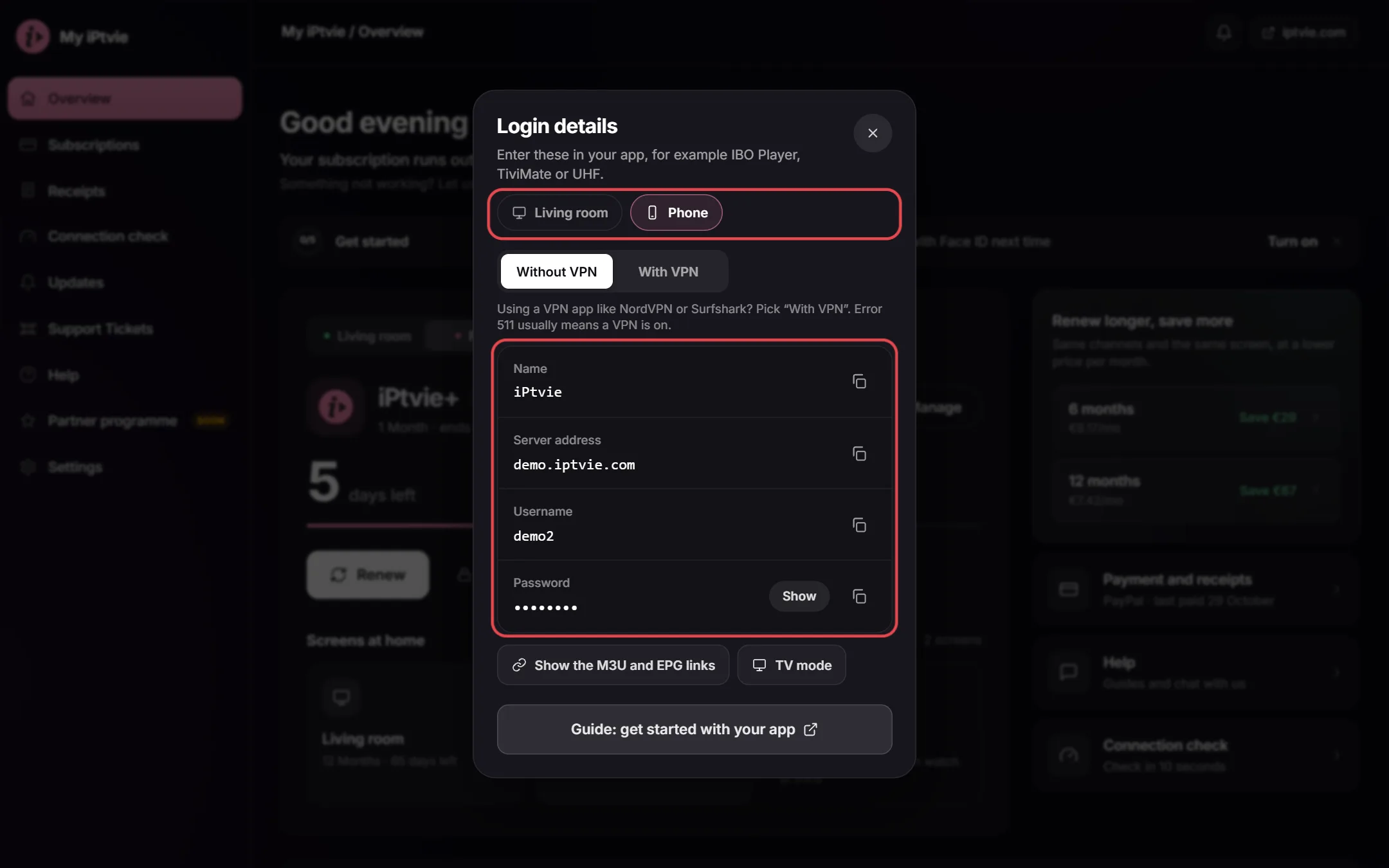
Your details are in My iPtvie under Login details: a server address, a username and a password. Tap a row to copy it, so you don't have to type it. Have several screens? Pick the right one at the top first.
Step 1: Install UHF
Open the App Store, search for UHF and install the app.
Step 2: Add your account
- Open UHF and choose to add a playlist.
- Select Xtream Codes, not M3U.
- Fill in a name (for example iPtvie), the server address, username and password.
- Save. Channels, programme guide, films and series load, usually within half a minute.
Using a VPN?
Then switch to With VPN at the top of Login details before you copy the server address. The username and password stay the same. More about the VPN connection.
Step 3: Choose the stream format TS
Go to Settings → General → Preferred video stream format and select TS. It is the first thing to check if live channels won't start, or only start sometimes.
More settings and answers about UHF are in the UHF guide.
Exclusive for iPtvie customers: 9Xtream 4K Player for life
9Xtream 4K Player also runs on iPhone and iPad. Try it free for 7 days, then send us the app's MAC address and device key and we activate it for life, at no cost. See how it works.
Frequently asked questions
Does UHF cost anything?
UHF is free to download and use. The optional UHF Pro adds syncing between devices, among other things, and removes ads. What it costs is up to UHF.
Are there other apps for iPhone and iPad?
Yes. IPTVX has a good-looking interface and suits the iPad well, and 9Xtream 4K Player is activated for life for free for iPtvie customers. More in Other apps.
Can I send the picture to the TV with AirPlay?
AirPlay rarely works well with IPTV. It is better to install an app on the device connected to the TV. With an Apple TV, use UHF there too, see Best App for Apple TV.
Can I use the same account on iPhone, iPad and Apple TV?
Yes, with the same details. One screen gives one stream at a time. To watch on several screens at once, add a screen in My iPtvie.
The programme guide won't load
Turn off iCloud Private Relay or any VPN and reload the playlist. With Xtream Codes, UHF fetches the guide itself, so you don't need an EPG address.
Does it work abroad and on mobile data?
Yes, wherever you have a stable connection. See iPtvie abroad and What internet speed do I need?.
Summary
- Install UHF from the App Store
- Add your account with Xtream Codes
- Select TS under Settings → General → Preferred video stream format