
How do I watch IPTV on my computer?
The apps we recommend for Windows and Mac, and how to add your iPtvie account in each.
On a computer you watch iPtvie in an app. Here are the ones we recommend, and how to add your account.
| Our pick | Also works | |
|---|---|---|
| Windows | 9Xtream 4K Player (free lifetime activation) | IBO Player, MyIPTV Player |
| Mac | IBO Player | UHF or IPTVX (from the Mac App Store) |
9Xtream 4K Player (Windows)
- Install 9Xtream 4K Player from the Microsoft Store and open it.
- Note the MAC address and device key on the start screen.
- Add your account on 9xtream4k.com with Add XC Playlist and restart the app.
Try it for 7 days, then send us the MAC address and device key and we activate it for life at no cost. Every step is in the 9Xtream 4K Player guide.
IBO Player (Windows and Mac)
- Download the app from iboplayer.com and start it.
- Note the MAC address and device key on the app's start screen.
- Add your account on IBO Player's website.
Every step, with what to fill in where, is in the IBO Player guide.
UHF and IPTVX (Mac)
On a Mac with Apple silicon, UHF and IPTVX are available from the Mac App Store. Add your account with Xtream Codes and choose the stream format TS. See the UHF guide.
The details you fill in
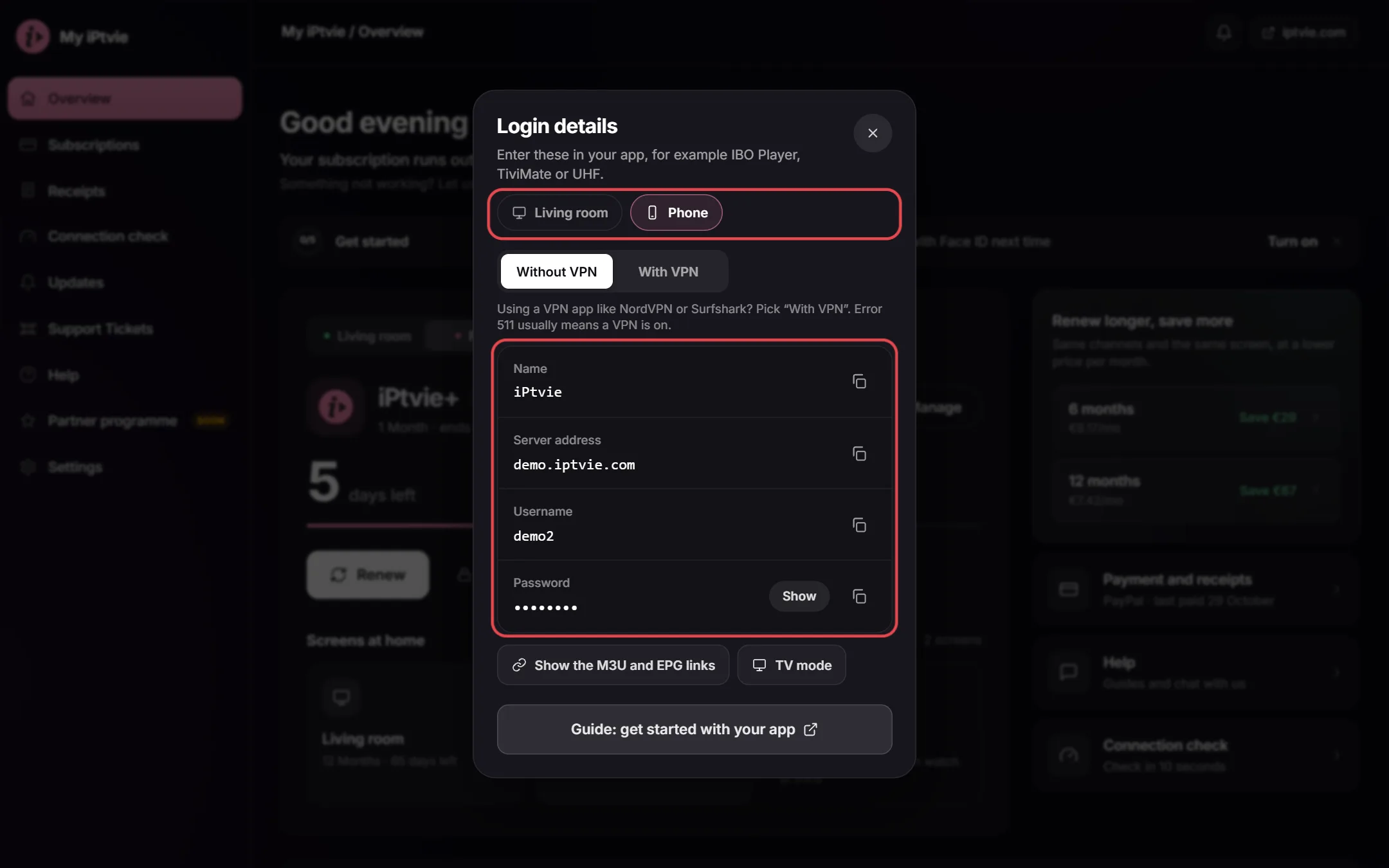
The apps ask for Xtream Codes: a server address, a username and a password. You find them in My iPtvie under Login details.
Using a VPN?
Then switch to With VPN at the top of Login details before you copy the server address. The username and password stay the same. More about the VPN connection.
Frequently asked questions
Can I use VLC?
VLC can only play the M3U link and has no Xtream Codes support, so there is no programme guide and the list is hard to browse. It is fine for a quick test, but use one of the apps above for everyday viewing.
Are there more apps for computers?
Yes. IPTVnator is available for Windows, Mac and Linux, and MyIPTV Player for Windows. Both take Xtream Codes. How to add your account is in Other apps.
Does IBO Player cost anything?
IBO Player is not our app. It has its own trial from installation, and after that it is activated per device with IBO Player. The price is on their website and has nothing to do with your iPtvie subscription.
I found a website that plays M3U links. Does it work?
Usually not. Browsers block most IPTV streams on third-party websites. Use an app.
Can I show the computer's picture on the TV?
Yes, with an HDMI cable between the computer and the TV. If you watch on the TV often, an app on the TV or on a box is easier. See Compatibility with iPtvie.
The live channels won't start in the app, but films and series work
Select MPEG-TS or TS as the stream format in the app's settings and reload the playlist.
Summary
- Windows: 9Xtream 4K Player, activated for life for free for iPtvie customers
- Windows and Mac: IBO Player
- Mac: UHF or IPTVX from the Mac App Store also work
- VLC has no Xtream Codes support and isn't suited to everyday viewing