
Can I use my Formuler box with iPtvie?
Yes. Formuler boxes work brilliantly with iPtvie in Formuler's own app, MYTVOnline. Which version you have, and how to add your account.
Yes. Formuler boxes work brilliantly with iPtvie in Formuler's own app, MYTVOnline.
Which app should I use?
| Model | App |
|---|---|
| Z7+, Zx, Z+, Z Prime, Z Nano | MYTVOnline |
| Z8, Z8 Pro, Z Alpha, Z+ Neo, Z10, Z10 Pro, Z10 Pro Max | MYTVOnline 2 |
| Z11 Pro, Z11 Pro Max, Z mini | MYTVOnline 3 |
| Z12 series | MYTVOnline 4 |
If your box has received a newer version through an update, use the MYTVOnline that is on the home screen.
Add iPtvie step by step
- Open MYTVOnline and go to the portals: MYTVOnline 2: Menu → Connections. MYTVOnline 3: Content Manager → Content Sources. MYTVOnline 4: Menu → Settings → App Settings → Content Sources.
- Add a new portal and tick Login required? (in older versions Is the login required?). Without that box ticked, the box connects as a MAG portal and is refused.
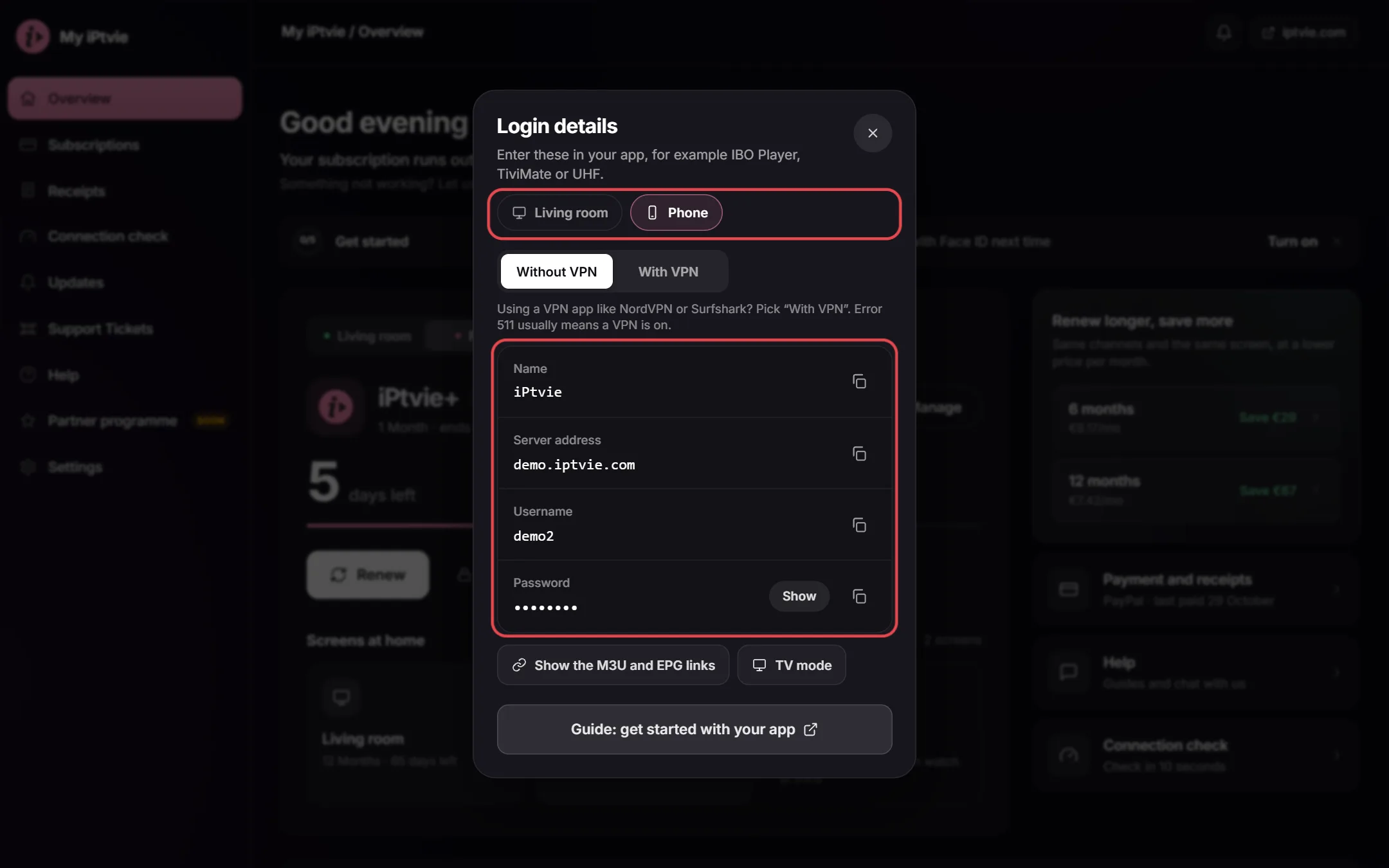
- Fill in:
| Field | What to enter |
|---|---|
| Portal Nickname | iPtvie |
| Portal URL | Just the server address from My iPtvie, without anything added after it |
| Username | Your username |
| Password | Your password |
- Connect. The content loads automatically.
You find the details under Login details in My iPtvie.
MYTVOnline+ on your phone
Go to Settings → Content Sources and tap +. You can also transfer the portal from the box: MYTVOnline 3 → Content Manager → Content Sources → Export Portal Data, and scan the QR code in MYTVOnline+. See App for Android Mobile.
What do you get access to?
- Live TV: channels from around the world
- Films and series on demand
- Programme guide (EPG) with programme information
- Catch-up on channels that support it
- Favourite channels for quick access
Frequently asked questions
How do I change the server address or the portal's name?
Edit the existing portal instead of adding a new one. MYTVOnline 2: Menu → Connections → the portal → Edit. MYTVOnline 3: Content Manager → Content Sources → the portal → Edit. MYTVOnline 4: Menu → Settings → App Settings → Content Sources → the portal → Edit. Save with UPDATE. Favourite groups belong to the portal address, username and password: if the address changes, the box sees it as a new portal.
How do I refresh the channel list?
MYTVOnline 3: Settings → Content Manager → Data Sync → Contents Data → Refresh. MYTVOnline 4: Content Sources → the portal → Refresh Content.
The TV guide is missing or shows the wrong time
MYTVOnline 3: Settings → Content Manager → Data Sync → EPG data → Clear and Update EPG. Wrong time: Content Manager → Content Source → the portal → Edit → EPG offset, and save with UPDATE. MYTVOnline 2: Connections → the portal → Edit → EPG offset.
How do I hide groups and countries I don't use?
MYTVOnline 2: Connections → the portal → Edit → EDIT GROUPS. MYTVOnline 3: Content Manager → Manage Groups → Show & Hide Groups. Change the order with Pin Groups.
Which PIN code applies?
The factory PIN is 0000. If it doesn't work for parental control in MYTVOnline, try 1234 or 7777. Lock a single channel: highlight it and press the yellow button on the remote.
The app won't start, crashes or shows “init failed”
If it happens on the box and in MYTVOnline+ on your phone at the same time, it's a fault at Formuler, not iPtvie: wait a while and try again. If it's only the box: Home → Settings → Apps → MYTVOnline → Clear cache. If that doesn't help: Clear data (this removes your portals and favourites, so make a backup first).
Error code 3, 7, 1010 or “Unknown portal”
The box can't reach the server. Check that the Portal URL is exactly the address from My iPtvie, starting with http://, and that Login required? is ticked. Then try connecting the box to your phone's hotspot: if it works there, your internet provider is blocking it, and a VPN will help.
Can I use the same iPtvie account on the box and another device?
Yes, but one screen gives one stream at a time. To watch at the same time, add a screen in My iPtvie.
Summary
- The right MYTVOnline depends on your model: use the one on the home screen
- Add the portal with Login required? ticked and just the server address as the Portal URL
- Edit the existing portal instead of adding a new one when the address changes
- “Init failed” on both the box and your phone is Formuler's fault and passes