
9Xtream 4K Player: free lifetime activation for iPtvie customers
An exclusive for iPtvie customers: 9Xtream 4K Player with lifetime activation included. Try it for 7 days, send us the MAC address and device key, and we activate it for life.
Exclusive for iPtvie customers
Most IPTV apps charge a fee per device after the trial. With iPtvie, 9Xtream 4K Player is activated for life at no cost. Try it free for 7 days, then send us two codes from the app and we activate it.
9Xtream 4K Player is a modern IPTV player with a clean interface, 4K playback, live TV, films and series. It runs on most TVs, boxes, phones and computers, so many customers can use the same app everywhere.
Where does it work?
| Device | Where to get it |
|---|---|
| Samsung TV | Samsung's app store: search for 9Xtream 4K Player |
| LG TV | LG Content Store: search for 9Xtream 4K Player |
| Android TV, Google TV, Android phones | Google Play: 9Xtream 4K Player |
| Fire TV Stick | The Downloader app with the code 6785912 |
| iPhone and iPad | App Store: 9Xtream 4K Player IPTV Live |
| Roku | Roku Channel Store: search for 9Xtream 4K Player |
| Windows | Microsoft Store: 9Xtream 4K Player |
Not on the list? Use the app we recommend for your device instead: see App for LG/Samsung TV or Other apps.
Step 1: Install the app
Install 9Xtream 4K Player from the store on your device (see the table) and open it. The start screen shows the device's MAC address and device key. Write both down, or take a photo: you need them in step 2 and step 4.
Step 2: Add your iPtvie account
- On your phone or computer, open 9xtream4k.com and go to Manage playlists.
- Log in with the MAC address (and device key, if asked) exactly as the app shows it.
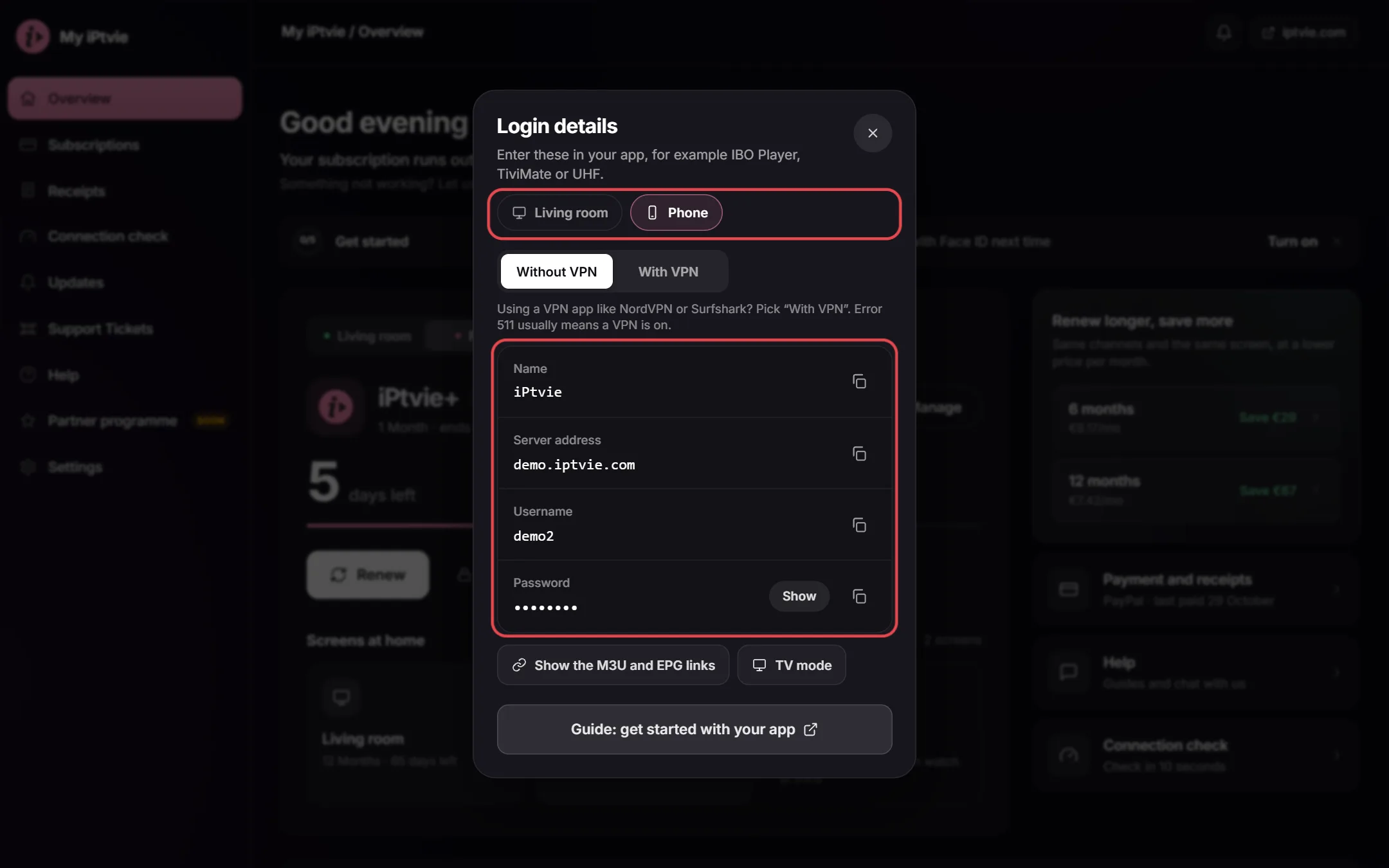
- Choose Add XC Playlist (XC is Xtream Codes) and fill in a name, for example iPtvie, plus the server address, username and password from My iPtvie.
- Save, then restart the app on your TV. It fetches the playlist when it starts.
Your details are in My iPtvie under Login details: a server address, a username and a password. Tap a row to copy it, so you don't have to type it. Have several screens? Pick the right one at the top first.
Using a VPN?
Then switch to With VPN at the top of Login details before you copy the server address. The username and password stay the same. More about the VPN connection.
Step 3: Try it for 7 days
The app runs as a free trial for 7 days. Use it as much as you like: channels, films, series and the programme guide all work.
Step 4: Get your lifetime activation from us
Happy with the app? Before the trial ends, send us:
- the MAC address shown in the app
- the device key shown in the app
Send them in the chat or as a support ticket in My iPtvie. We activate the app for life on that device, at no cost to you. Restart the app afterwards, and it shows as activated.
One activation per device
The activation is tied to the device's MAC address. Using 9Xtream on another TV or phone too? Send us that device's MAC address and device key as well.
Frequently asked questions
Is it really free?
Yes. The lifetime activation is included for iPtvie customers. You do not pay 9Xtream anything, and we do not charge for it.
What happens if my iPtvie subscription ends?
The app stays activated on your device. To watch, you need an active subscription, and when you renew, everything works again straight away.
I can't find the device key
Look on the app's start screen and under its settings or account page. If you only see a MAC address, send us that, and we will tell you if we need anything else.
The playlist doesn't show up in the app
Restart the app after saving the playlist on the website: it only fetches it at start. Then check that the MAC address on the website is exactly the one the app shows.
Live channels won't start, but films and series work
Open the app's settings and change the stream format to MPEG-TS (or TS) if the option is there, then reload the playlist.
I changed TV. Can I move the activation?
Send us the new device's MAC address and device key in the chat, and we will activate the new device.
Summary
- 9Xtream 4K Player runs on Samsung, LG, Android TV, Fire TV, iPhone, iPad, Roku and Windows
- Add your account on 9xtream4k.com with Add XC Playlist, then restart the app
- Try it free for 7 days
- Send us the MAC address and device key, and we activate it for life at no cost