
How do I install IPTV on a Fire TV Stick?
TiviMate isn't in Amazon's store, so you fetch it with the Downloader app and a code. Allow ten minutes.
You install the TiviMate app with the help of the Downloader app, and then add your account with Xtream Codes. TiviMate isn't in Amazon's app store, so it is fetched with a code instead. Allow ten minutes.
The guide applies to the Fire TV Stick, the Fire TV Cube and TVs with Fire TV built in, as long as the device runs Fire OS.
Newer Fire TV models with Vega OS
The Fire TV Stick 4K Select and newer Fire TV devices running Vega OS can't install apps from outside Amazon's store, so TiviMate can't be installed on them. You can see which system your device runs under Settings → My Fire TV → About. If so, use another device, such as a Google TV device.
What you need
- A Fire TV device with Fire OS, connected to the internet.
- Your iPtvie details: server address, username and password.
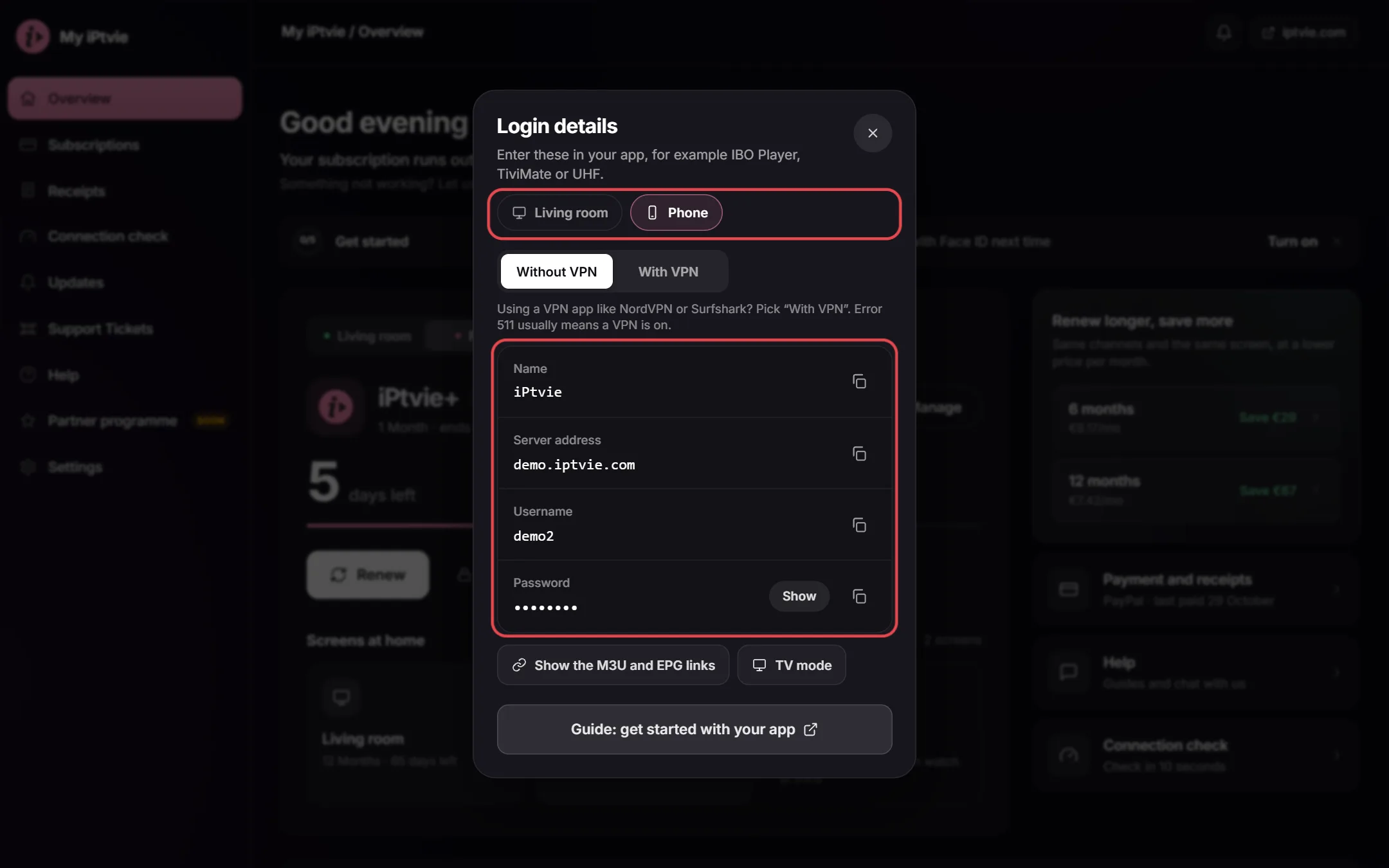
Your details are in My iPtvie under Login details: a server address, a username and a password. Tap a row to copy it, so you don't have to type it. Have several screens? Pick the right one at the top first.
Step 1: Install Downloader
- Go to Find (the magnifying glass) on the home screen and search for Downloader.
- Select the Downloader app and press Get or Download.
Step 2: Allow Downloader to install apps
- Open Settings → My Fire TV → Developer Options.
- Select Install unknown apps and turn it on for Downloader.
Can't see Developer Options?
Go to Settings → My Fire TV → About, highlight the device name at the top and press the centre button on the remote seven times. Go back one step, and Developer Options is in the list.
Step 3: Get TiviMate
- Open Downloader.
- Enter the code 272483 (or the address tivimate.com/apk) and press Go. That is TiviMate's official installation file.
- Press Install when the file has downloaded, and then Open.
Step 4: Add your account
- Select Add playlist in TiviMate.
- Select Xtream Codes, not M3U.
- Fill in the server address, username and password, exactly as written in My iPtvie.
- Continue with Next. Channels, programme guide, films and series load.
Live channels won't start, but films and series work?
Change the stream format to MPEG-TS (sometimes just TS) under Settings → Playlists → your playlist → Xtream Codes parameters, then reload the playlist. It is the first thing to check.
Everything about settings, favourites and the programme guide is in the TiviMate guide.
Exclusive for iPtvie customers: 9Xtream 4K Player for life
9Xtream 4K Player also runs on Fire TV (Downloader code 6785912). Try it free for 7 days, then send us the app's MAC address and device key and we activate it for life, at no cost. See how it works.
Frequently asked questions
Is TiviMate in Amazon's app store?
No. That is why it is installed with Downloader, which is in the store. The code 272483 fetches TiviMate's own installation file.
Does TiviMate cost anything?
TiviMate has a free version and a paid Premium. Films and series need Premium, and so do recording, several playlists and catch-up. On Fire TV you buy Premium through the TiviMate Companion app on an Android phone, or at tivimate.com. The fee goes to TiviMate and has nothing to do with your iPtvie subscription.
The picture buffers or stutters
A Fire TV Stick often sits behind the TV, where the WiFi signal is weakest. Use the extension cable that came with it, move the router closer, or use a wired network adapter. More causes and fixes in Buffering: causes and solutions.
I don't have a Fire TV Stick yet. Which device should I choose?
If you want TiviMate without detours, a device with Google TV is easiest, since the app is in Google Play. See Android TV and Google TV. If most of your devices are Apple, an Apple TV is a good fit.
Can I use another app than TiviMate?
Yes. 9Xtream 4K Player installs the same way with the Downloader code 6785912, and is activated for life for free for iPtvie customers. More in Other apps.
Summary
- Install Downloader from Amazon's store and allow it under Developer Options
- Get TiviMate with the code 272483
- Add your account with Xtream Codes and the stream format MPEG-TS
- Devices with Vega OS can't install TiviMate