
Which apps are recommended for LG or Samsung TV?
Our pick for each TV brand, what to do when an app isn't in your store, and how to reset a Samsung TV that gets stuck.
Finding the right IPTV app for a smart TV can be frustrating. Neither LG nor Samsung has generous app support, and the most popular IPTV apps simply aren't in their stores. But there are good solutions, and this page walks you through them.
Our strong recommendation: an external streaming device
If you want a hassle-free experience, an external streaming device gives a noticeably better result than the TV's built-in system. The reasons:
- More apps to choose from: Apple TV and Google TV run the best IPTV apps, such as UHF and TiviMate
- Better performance: more memory and faster processors mean quicker channel changes and less buffering
- Long sessions hold: TV apps often drop after a few hours, external devices don't
- Future-proof: you don't depend on your TV maker approving and maintaining apps
The best options are Apple TV (for Apple users) and Chromecast with Google TV or Nvidia Shield (for Android users). See Best App for Apple TV and Android TV and Google TV.
What works directly on the TV?
If you would rather not buy an external device, here is our pick for each TV:
| TV | Our pick | If it isn't in your store |
|---|---|---|
| Samsung (Tizen) | BobPlayer or 9Xtream 4K Player | SmartOne IPTV |
| LG (webOS) | IBO Player or 9Xtream 4K Player | SmartOne IPTV |
| Hisense / Toshiba (VIDAA) | SmartOne IPTV | An external device |
| Philips, Sony, TCL with Google TV or Android TV | TiviMate from Google Play | – |
| Philips with Saphi (most from 2018 to 2022) | An external device | – |
Exclusive for iPtvie customers: 9Xtream 4K Player for life
9Xtream 4K Player also runs on Samsung and LG TVs. Try it free for 7 days, then send us the app's MAC address and device key and we activate it for life, at no cost. See how it works.
The app store on Samsung: press Home and choose Search (the magnifying glass). On older models: Apps → search at the top right. On LG: open the LG Content Store (Apps) from the home screen and search. Don't change the country on your TV to find an app: pick one of the apps in the table instead.
App prices are shown in the store
Most TV apps have a free trial and then a small fee per TV, paid to the app maker. Prices are the apps' own and change without notice, so we don't list them here. 9Xtream 4K Player is the exception: we activate it for free.
SmartOne IPTV: how to add iPtvie
SmartOne is in the Samsung, LG and VIDAA app stores.
- Install and open SmartOne IPTV. Write down the MAC address shown on the screen.
- Go to smartone-iptv.com and choose to upload a playlist.
- Choose the Xtream tab and fill in the TV's MAC address, a name (for example iPtvie), the server address, the port (80 unless your server address shows another), your username and password.
- Tap Add Playlist and restart the app on your TV.
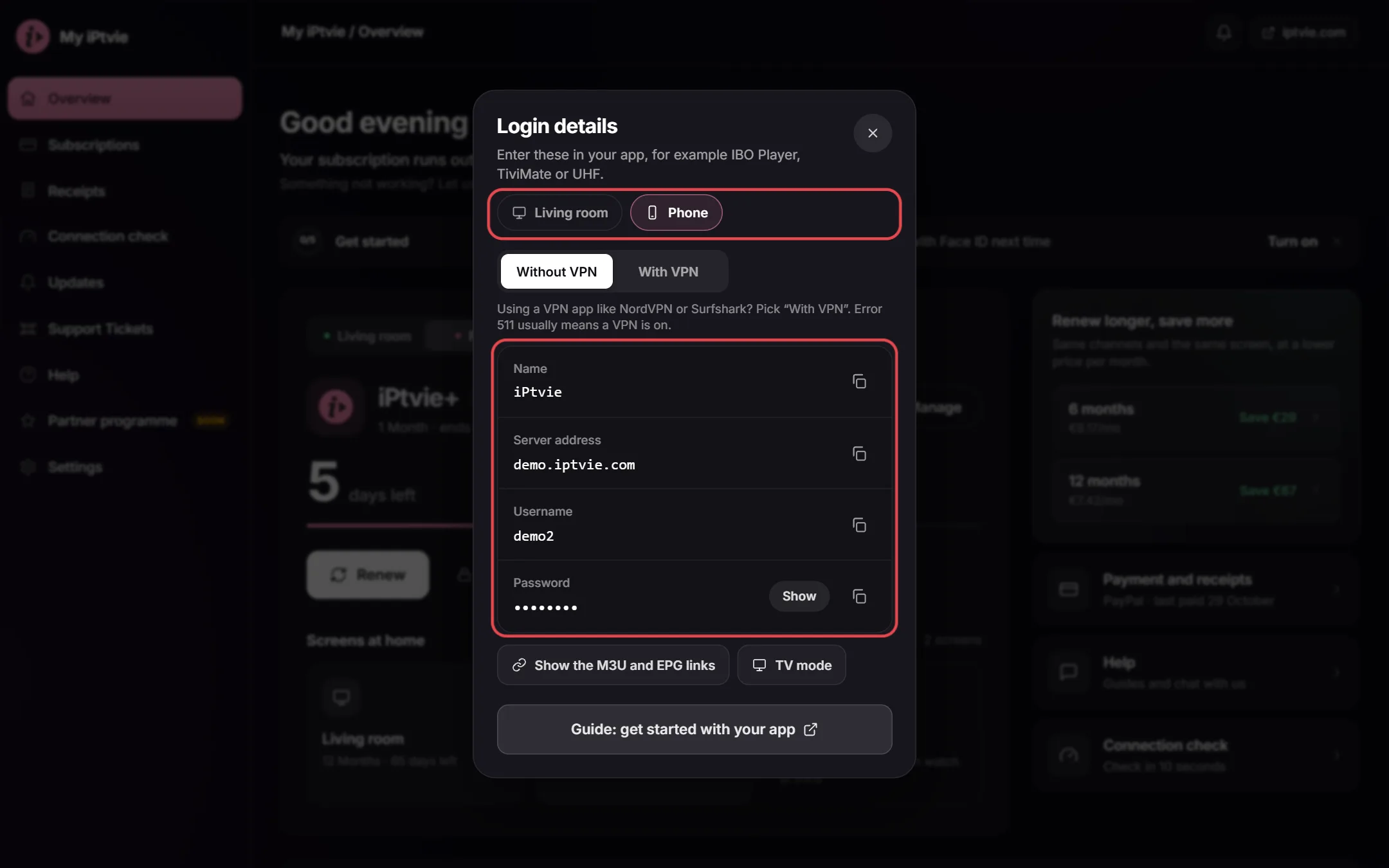
Your details are in My iPtvie under Login details: a server address, a username and a password. Tap a row to copy it, so you don't have to type it. Have several screens? Pick the right one at the top first.
Extra tips for a better experience
- Use a network cable instead of WiFi: steadier streaming and much less buffering
- Check for H.265 support: newer TVs play HEVC channels, which need less bandwidth
- Keep the TV's firmware updated: an up-to-date TV runs apps better
Frequently asked questions
Why isn't TiviMate or UHF in the LG/Samsung store?
TiviMate is an Android app and UHF is an Apple app. LG (webOS) and Samsung (Tizen) have their own systems and don't share apps with Android or Apple.
The app won't start or gets stuck on a Samsung TV
Unplug the TV from power for a minute. If that doesn't help, reset Smart Hub (downloaded apps are removed and have to be installed again). 2025 models: Settings → All Settings → Support → Device Care → Reset Smart Hub. 2022 to 2024: Settings → All Settings → Support → Device Care → Self Diagnosis → Reset Smart Hub. 2020 and 2021: Settings → Support → Device Care → Self Diagnosis → Reset Smart Hub. The PIN is 0000 unless you changed it.
Can I install apps from outside the store?
In practice, no. Samsung and LG only allow their own stores for normal users. Choose an app from the table above, or an external device.
The app shows a MAC address, device key or QR code instead of a login
Then it is an app you set up through its website (like IBO Player, BobPlayer, 9Xtream or SmartOne). You add your account on the app's website using the MAC address from your TV, and then restart the app.
Why don't you recommend IPTV Smarters any more?
It has disappeared from several stores and stopped working for many users. On Samsung we recommend BobPlayer, on LG IBO Player, and on both 9Xtream 4K Player.
The picture freezes after a couple of hours
That is typical for TV apps on long sessions. See The picture freezes after a few hours.
Which external device do you recommend most?
For Apple users, Apple TV. For everyone else, a Chromecast with Google TV as the affordable option, or an Nvidia Shield for maximum performance.
Summary
- LG and Samsung have limited IPTV app support: an external device gives the best experience
- On the TV: BobPlayer on Samsung, IBO Player on LG, and 9Xtream 4K Player on both
- 9Xtream 4K Player is activated for life for free for iPtvie customers
- Use a network cable for the most stable streaming