IPTV Smarters is a versatile IPTV player that works on various Smart TVs. Follow these steps to set it up:
Installation:
Go to your TV’s app store or application hub.
Search for “IPTV Smarters” and install it on your Smart TV.
Launch the App:
Open the IPTV Smarters app on your TV.
Login or Enter Details:
You’ll be prompted to enter your IPTV login credentials or subscription details.
Typically, you’ll need to enter:
Username and Password
Server URL or M3U playlist URL provided by us.
Configuration:
Customize settings like EPG (Electronic Program Guide) and user interface preferences.
Enjoy IPTV:
Once set up, you can browse and watch your favorite IPTV channels and content.
II. Set IPTV Setup
Set IPTV is another IPTV application that works on Smart TVs. Here’s how to set it up:
Step 1: You can download SetIPTV / NetIPTV / IBO Player Pro / IBO Player from your TV store on Samsung, LG …
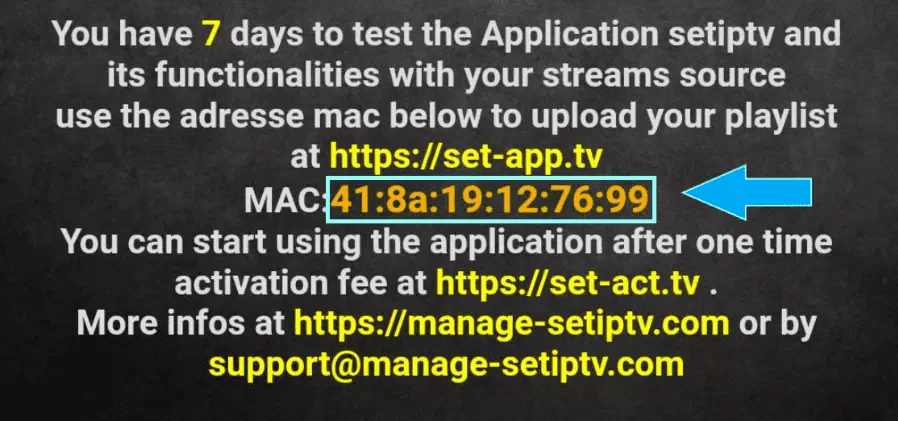
Step 2: After the installation, open the app you will find MAC Address on screen, with IBO Player Pro and IBO Player you will find MAC Address and Device Key
EX :
Step 3: Send us the MAC address via Whatsapp/Email/Live Chat
Step 4: After few minutes, restart/reboot your TV and Open the app
We use cookies to ensure that we give you the best experience on our website. If you continue to use this site we will assume that you are happy with it.